

Authentication Flow
The diagram below shows the complete end-to-end flow. The process uses the OAuth 2.0 Authorization Code grant with OpenID Connect (OIDC) extensions. All steps are automated — the End User only needs to open the app.
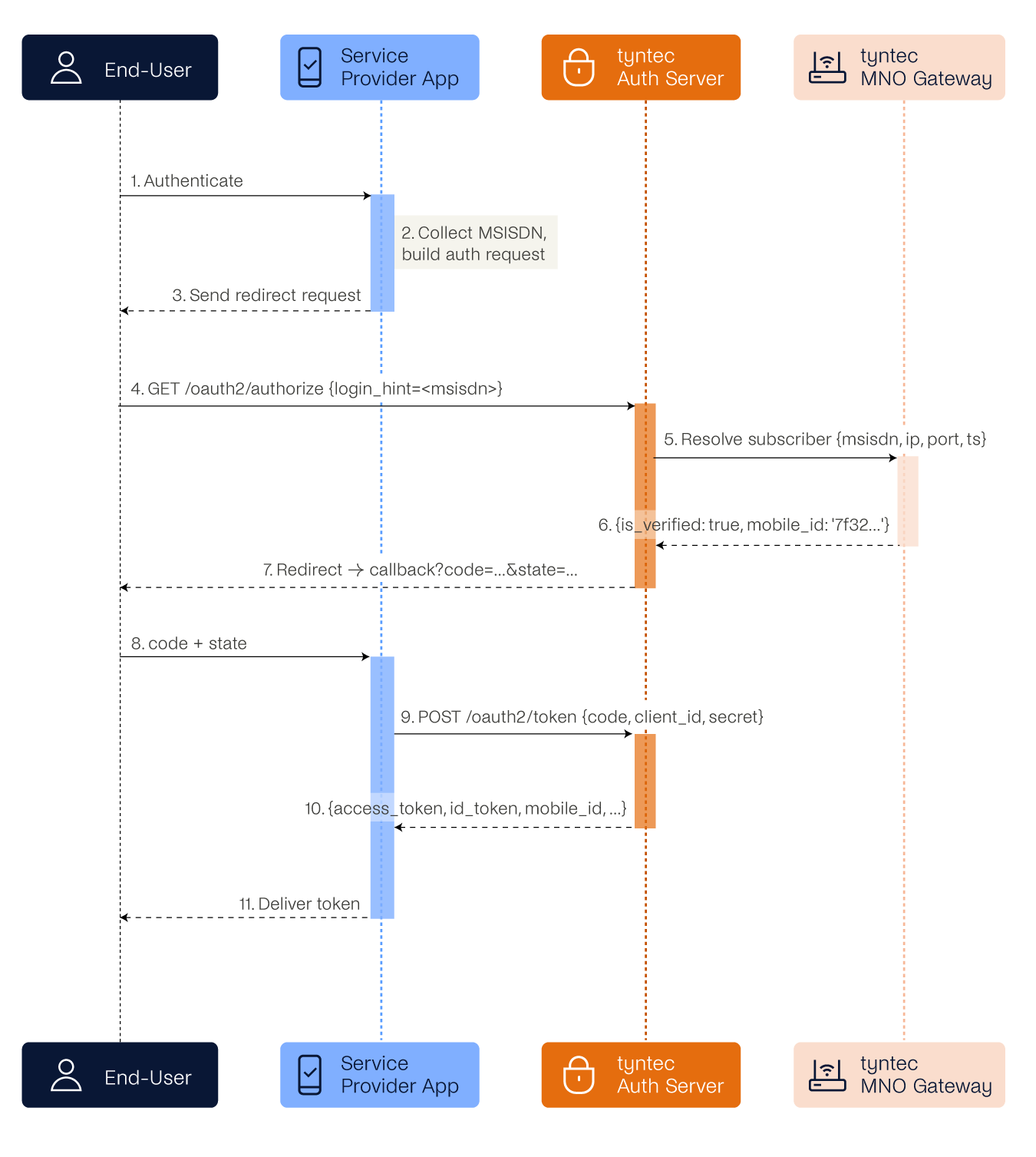
Figure 1 — Silent Authentication sequence diagram
Step-by-step description
| Action / Actor | Description |
| Initiate Authentication End User → Client |
The End User triggers an authentication action within your application. The client application begins the OIDC flow. |
| Build Authorization Request Client (internal) |
Your client collects the required parameters: client_id, redirect_uri, scope, state, response_type=code, and login_hint (MSISDN of the End User). It constructs the authorization redirect URL. |
| Redirect to Authorization Endpoint Client → End User |
The client redirects the End User’s browser to the /oauth2/authorize endpoint. |
| Forward to Authorization Server End User → Customer-facing Service |
The End User’s browser follows the redirect and delivers the request to tyntec’s authorization server. |
| Trigger Network Authentication Customer-facing Service → Proxy Service |
The authorization server extracts the MSISDN, records the End User’s public IP, port, and timestamp, then forwards these to the internal Proxy Service for subscriber resolution. |
| Return Authentication Result Proxy Service → Customer-facing Service |
The Proxy Service returns is_verified=true and a unique MobileID if the MSISDN matches the resolved session, or is_verified=false if not. |
| Issue Authorization Code Customer-facing Service → End User |
On successful verification, the authorization server issues a redirect to your registered redirect_uri with a short-lived authorization code and the original state parameter. |
| Deliver Code and State End User → Client |
The End User’s browser follows the redirect, delivering the code and state to your client application. |
| Exchange Code for Token Client → Authorization Server |
Your client sends the authorization code to the /oauth2/token endpoint, along with client_id, client_secret, grant_type=authorization_code, and redirect_uri. |
| Return Tokens Authorization Server → Client |
The authorization server validates the code and returns an access_token (JWT) and refresh_token. The access_token includes the mobile_id claim and granted scopes. |
| Deliver Token to End User Client → End User |
Your client receives the tokens and completes the session. The End User is now authenticated. |
| Retrieve Verification Result (optional) Client → Authorization Server |
Optionally, your client can call GET /oauth2/userinfo with the access_token as a Bearer token. This returns mobile_id, phone_number_verified, login_hint, and sub as plain JSON — without decoding the JWT. If verification succeeded, sub is a UUID; if it failed, sub is “anonymous” and phone_number_verified is “false”. |
login_hint
The login_hint parameter in the /oauth2/authorize request controls how tyntec collects the End User’s phone number. Understanding this behavior is important when designing your integration.
| Scenario | Behaviour |
| login_hint provided | login_hint is mandatory for the tt:phone_verify scope. Your application passes the MSISDN. tyntec resolves the network session and verifies the MSISDN against the network-resolved number. If the MSISDN matches, the service returns an authorization code and the user ID as the sub claim. If the MSISDN does not match, the service returns an authorization code with an anonymous sub claim and phone_number_verified = false. The MSISDN must be in E.164 format (e.g. +301234567890). |
| login_hint not provided | login_hint is optional for the tt:mobile_id scope. Tyntec recommends providing the login_hint for improved security and a better user experience. If it is not provided, the end user will be prompted to enter their phone number, and Tyntec will resolve the network session automatically. |
Design tip: if your app already collects the user’s phone number (e.g. at registration), pass it as login_hint for a fully seamless experience. If not, omit it — tyntec will ask the user directly. Either way, the network verification works the same.
The client needs to validate that the login_hint sent, matches the value returned by tyntec.